

xnotes
The Digital Canvas for Modern Thinkers
• xnotes reimagines the mobile notebook, bridging the physical satisfaction of pen-on-paper with the limitless flexibility of digital vector technology.
• Designed specifically for stylus users, it ensures that your ideas remain fluid, editable, and infinitely crisp, no matter how deep you zoom.
The Art of Ink
1. Dynamic Stroke Engine:
• Our custom engine interprets pen pressure to create natural, variable-width ribbons that ebb and flow with your hand, abandoning the rigid look of traditional digital markers.
2. True Vector Foundation:
• Every mark is stored as editable data—not flattened pixels.
• Re-select, reshape, or restyle any stroke at any time, or preserve your work as high-fidelity vector PDFs.
3. Luminous Tools:
• Utilize real multiply-blend highlighters that darken upon overlap, or switch to the Neon pen for a bright, glowing aesthetic that brings your ideas to the foreground.
Intelligent Design
1. Seamless Workflow:
• Our interface respects your input; pan with your fingers while you draw with your stylus, or let the app automatically adapt if you are using a non-stylus device.
2. Intelligent PDF Handling:
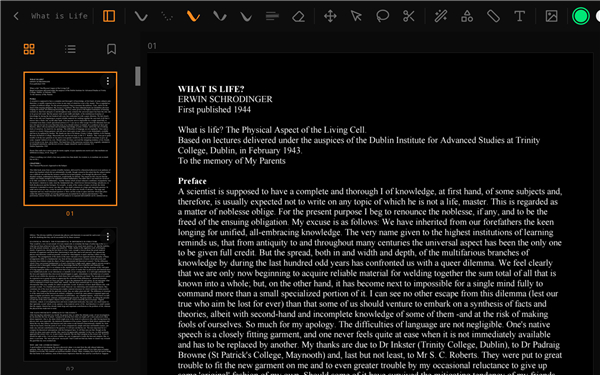
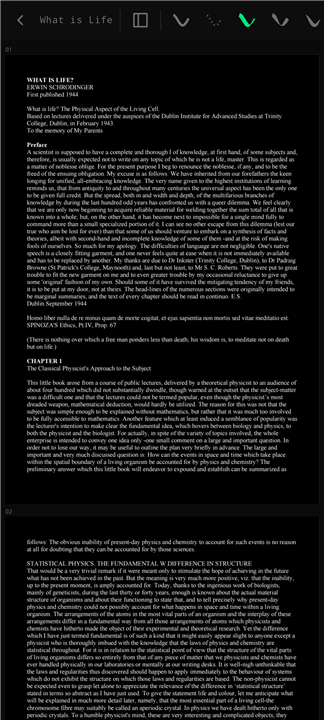
• Import documents for annotation and experience true dark mode, which inverts page layouts while keeping your embedded images and photos perfectly preserved.
3. Crystal-Clear Depth:
• With background-threaded rendering, your notes stay sharp even under extreme magnification, ensuring no pixelated edges during presentations or study sessions.
Connectivity & Privacy
1. Wireless Collaboration:
• Turn your tablet into a real-time smartboard.
• Broadcast your canvas directly to any web browser on your network with zero installation required for viewers.
2. Privacy-First Philosophy:
• We believe your notes belong to you.
• xnotes is open-source, requires no accounts, collects no telemetry, and requests no intrusive storage permissions.
Essential Features
1. Organization:
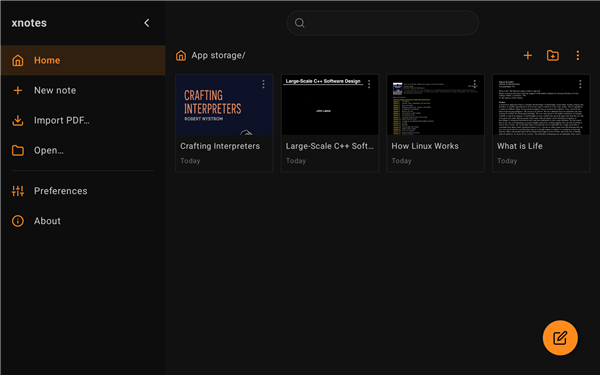
• Manage multi-page documents with ease using thumbnails, bookmarks, and a side-panel file explorer.
2. Versatility:
• Incorporate text boxes, shapes, and images alongside your handwritten notes.
3. Precision Control:
• Utilize robust selection tools, including lasso and box manipulation, alongside standard undo/redo functionality to perfect every detail.
4. Customization:
• Tailor the interface to your creative process with fully configurable themes, page defaults, and stylus side-button actions.
FAQ
Q: Can I edit my handwriting after I have finished a page?
A: Absolutely. Because every stroke is vector-based, you can use the selection tools at any time to re-select, reshape, or restyle your writing or drawings long after you have put your pen down.
Q: Does xnotes require me to create an account to use the features?
A: We prioritize your privacy above all else. You do not need an account to use xnotes; in fact, the app is open-source and does not collect any telemetry or personal data. Your notes belong entirely to you.
Q: How does the dynamic stroke engine improve the writing experience?
A: Our custom engine is designed to interpret your pen pressure in real-time. This creates natural, variable-width ribbons that mimic the fluidity of a physical pen, moving away from the rigid, artificial look often found in traditional digital marking tools.
Version History
v0.8.7——21 Jul 2026
Experience xnotes: the ultimate vector-based digital notebook for stylus users. Enjoy natural ink, infinite zoom, and privacy-first. Download the latest version of xnotes to your phone to enjoy new features and updates immediately!
*0.8.7
• Add a Material You palette style with dynamic color
• Support SVG images with clipboard paste and PDF export
• Add a stamps library to the image menu
• Color code notes from the full swatch matrix
• Draw dashed shapes
• Snap the ruler to horizontal and vertical
• Jump to a page from the toolbar page counter
• Add user min and max zoom limits
• Minor fixes and improvements
*0.8.6
• Shrink note files with compacted ink storage
• Save and load large notes faster
• Reduce memory use while editing
*0.8.5
• Fix disappearing ink
• Improve Calligraphy pen
- AppSize20.10M
- System Requirements5.0 and up
- Is there a feeFree(In game purchase items)
- AppLanguage English
- Package Namecom.xnotes
- MD5
- PublisherShardul Vikram Singh
- Content RatingTeenDiverse Content Discretion Advised
- Privilege19
-
xnotes 0.8.7Install
20.10M2026-10-28Updated










9.9
1472 Human Evaluation
- 5 Star
- 4 Star
- 3 Star
- 2 Star
- 1 Star




