

WG Tunnel
Overview
• WG Tunnel is a high-performance WireGuard client designed to bridge the gap between user-friendly simplicity and professional-grade functionality.
• It caters to individuals seeking seamless VPN automation as well as power users requiring advanced privacy controls across mobile and television platforms.
Automation and Intelligence
1. Auto-Tunneling:
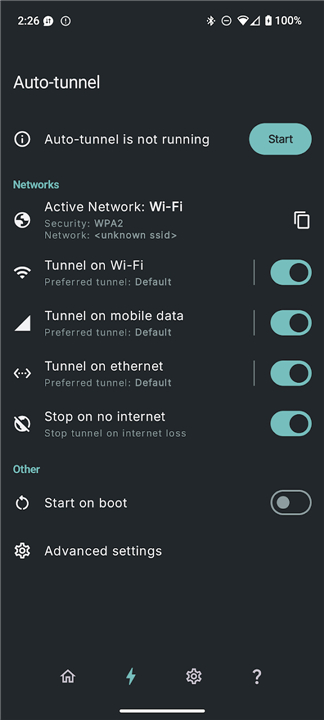
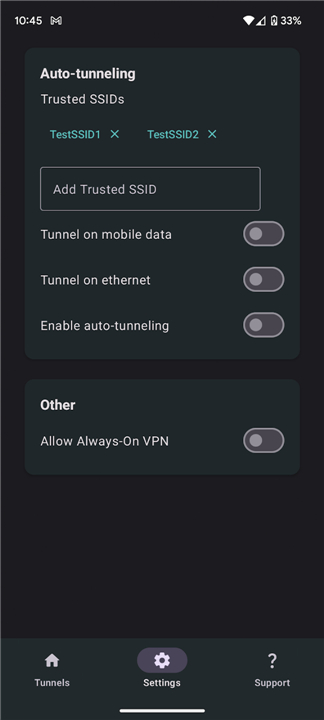
• Configure the application to automatically establish or disconnect tunnels based on active network parameters, such as specific Wi-Fi SSIDs or Ethernet connections.
2. Remote Control:
• Utilize intent-based automation to manage tunnels and auto-tunneling settings via external applications like Tasker.
3. Dynamic DNS:
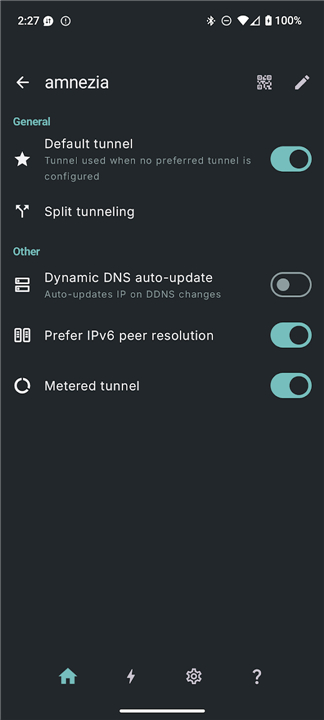
• The client automatically detects server IP changes and updates endpoints in real-time without requiring a manual tunnel restart.
Advanced Networking
1. Local Proxy Mode:
• Direct WireGuard traffic through local SOCKS5 or HTTP proxies, facilitating seamless integration with external privacy tools like AdGuard or standard web browsers.
2. Dual-Stack Handling:
• Benefit from intelligent endpoint selection that upgrades to IPv6 or falls back to IPv4 dynamically based on current network conditions.
3. Split Tunneling:
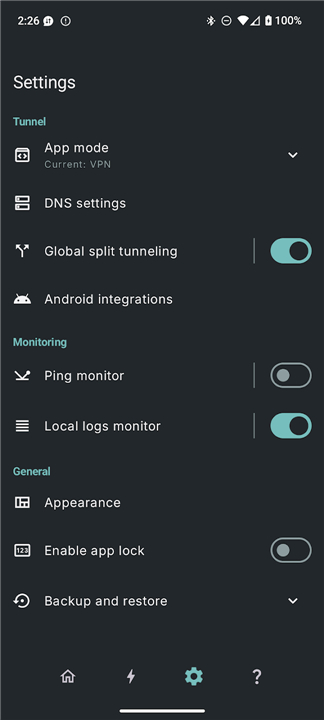
• Maintain granular control over data by selecting specific applications to route through the encrypted tunnel or exclude from the VPN entirely.
Security and Reliability
1. Deferred Bootstrapping:
• Enhance startup reliability and prevent data leaks by resolving endpoints and updating peers only after the tunnel is fully active.
2. Lockdown Mode:
• Access an integrated kill switch that halts all internet traffic if the VPN connection drops, ensuring no unencrypted data escapes the device.
3. AmneziaWG 2.0:
• Native support for advanced obfuscation protocols provides robust protection against strict censorship and deep packet inspection.
User Experience
1. Real-time Monitoring:
• View handshake data and connection health instantly through a dedicated monitoring interface.
2. Quick Controls:
• Access VPN toggles via Android Quick Settings tiles and home screen shortcuts for immediate connectivity.
3. Device Compatibility:
• Includes a fully optimized interface and feature set specifically tailored for Android TV.
FAQ
Q: Can I set WG Tunnel to connect automatically when I leave my home Wi-Fi?
A: Yes, you absolutely can! With the Auto-Tunneling feature, you can configure the app to intelligently start or stop the VPN connection based on your active network. For example, you can set it to turn off when you are connected to your trusted home Wi-Fi and automatically kick in the moment you switch to mobile data or an untrusted public network.
Q: How can I use external automation tools like Tasker with WG Tunnel?
A: WG Tunnel supports remote control via intent-based automation, which means you can easily integrate it with powerful external apps like Tasker. This allows you to create custom triggers and scripts to manage your tunnel status and auto-tunneling rules based on virtually any condition your phone can detect.
Q: What happens if my VPN server's IP address changes while I am connected?
A: You do not have to worry about manual restarts because WG Tunnel features built-in Dynamic DNS support. The client automatically detects any changes to your server's IP address on the fly and updates the connection endpoints in real-time so your connection remains uninterrupted.
Version History
v5.2.1——27 Jul 2026
WG Tunnel is a WireGuard VPN client app that automates and manages secure connections. Download the latest version of WG Tunnel to enjoy new features and updates immediately!
*5.2.1
What's new:
- Bugfix for Wi-Fi changes failing to be detected while a VPN is active on certain OEMs
- Back press/swipe now properly clears selected tunnels instead of exiting the app
- Chevrons added to settings rows with subscreens
*5.2.0
What's new:
- Advanced tunnel DNS options like split and encrypted tunnel DNS
- IP4P support for servers behind CGNAT
- Bugfix for auto tunnel that sometimes caused rapid toggle of tunnels
- Bugfix for the tunnel stats job high CPU and battery usage on some devices
- Various other bugfixes and improvements
*5.1.0
What's new:
- Seamless tunnel recovery feature for tunnel connectivity recovery without dropping VPN protection
- Improved tile integration with tunnel statuses
- Toggle tunnel action added for remote control feature
- Auto-tunnel Wi-Fi detection bugfix on VPN starts
- Translations
- AppSize18.20M
- System Requirements5.0 and up
- Is there a feeFree(In game purchase items)
- AppLanguage English
- Package Namecom.zaneschepke.wireguardautotunnel
- MD5
- PublisherZane Schepke
- Content RatingTeenDiverse Content Discretion Advised
- Privilege19
-
WG Tunnel 5.2.1Install
18.20M2026-10-29Updated










9.5
4762 Human Evaluation
- 5 Star
- 4 Star
- 3 Star
- 2 Star
- 1 Star




