

SOS Flashlight Morse Code Tool
Turn Your Phone into a Morse‑Code Beacon
• Turn a ordinary smartphone into a reliable emergency‑signaling tool.
• The SOS Flashlight app lets you flash, vibrate, sound, or brighten the screen to send SOS or any custom message in Morse code—simultaneously or individually.
Core Features
1. Multiple Transmission Modes
• Flashlight: Uses the camera LED for bright visual pulses.
• Vibration: Delivers tactile signals for discreet alerts.
• Audio: Emits clear 700 Hz tones.
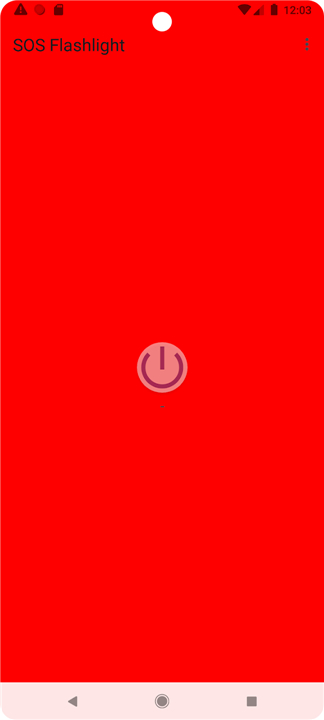
• Screen Light: Boosts screen brightness for night‑time flashing.
2. Convenient Controls
• Home‑Screen Widget: One‑tap activation of the flashlight.
• Background Service: Keeps signaling active when the app is minimized or the device is locked.
3. Customizable Messaging
• Enter any text and have it automatically converted to Morse code.
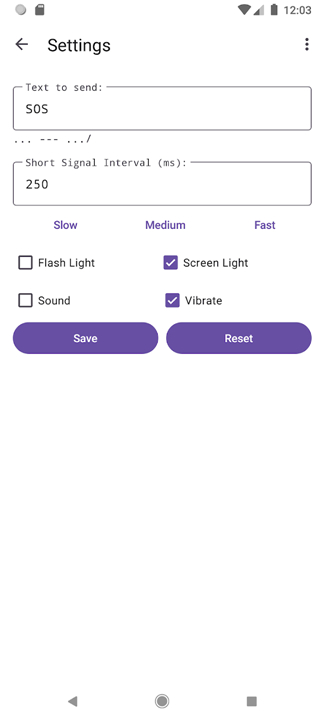
• Choose transmission speed – slow, medium, fast, or a custom rate.
4. Morse‑Code Decoder
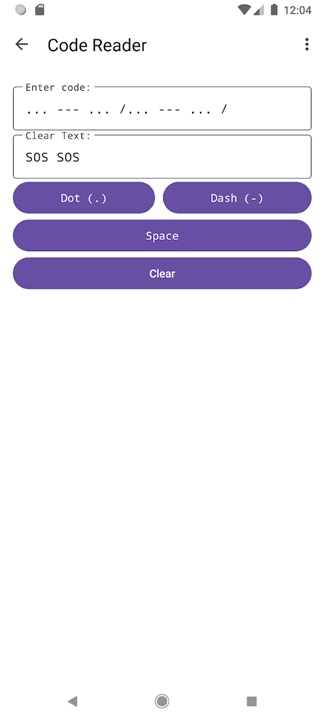
• Translate incoming Morse signals into readable text instantly.
5. User‑Defined Preferences
• Enable or disable each signaling method independently to suit the situation.
How to Use
• Emergency SOS: Tap the SOS button to start broadcasting the international SOS pattern (… --- …).
• Custom Message: Type your message, press Send, and watch the selected channels transmit it.
• Decoder: Open the decoder screen to convert received Morse pulses back into plain text.
• Settings: Adjust speed, toggle channels, and fine‑tune the app to your needs.
Contribute
• We welcome help from the community.
• Report bugs, suggest improvements, or submit pull requests on our GitHub repository.
License
• This software is released under the GNU General Public License v3 (GPL‑3.0).
• See the LICENSE file for full terms.
Source Code
• https://github.com/WeilJimmer/SOSFlashlightApp.git
FAQ
Q: How does the app send a signal?
A: When you press the SOS button or submit a custom text, the app converts the characters into dots and dashes. Those symbols are then expressed through the selected output channels—flashing the camera LED, brightening the screen, emitting a steady 700 Hz tone, or vibrating in short pulses. You can enable any combination of these methods, or use just one if the situation calls for it.
Q: Can I use the app while the phone is locked or in the background?
A: Yes. The app runs a background service that continues broadcasting the Morse code even when you switch to another app or lock the screen. This ensures the signal stays active without requiring you to keep the app in the foreground.
Q: What transmission speeds are available?
A: The tool offers three preset speeds—slow, medium, and fast—and also lets you define a custom rate measured in words‑per‑minute. Adjusting the speed lets you balance visibility with battery consumption, or match the listening capabilities of rescuers.
Version History
v1.0.3——27 Aug 2026
Turn your phone into a Morse code device, to transmit emergency messages. Download the latest version of SOS Flashlight Morse Code Tool to enjoy new features and updates immediately!
*1.0.3
1. Added: Screen Light color selection feature, now you can change the screen light color through the color palette.
2. Fixed: Allow the use of longer time intervals to enable normal vibration for devices that cannot vibrate in extremely short periods of time.
*1.0.2
Minor bug fixes and improvements. Install or update to the newest version to check it out!
*1.0.0
Minor bug fixes and improvements. Install or update to the newest version to check it out!
- AppSize9.54M
- System Requirements5.0 and up
- Is there a feeFree(In game purchase items)
- AppLanguage English
- Package Nameorg.wbftw.weil.sos_flashlight
- MD5
- PublisherWBFTeam 白樺論壇團隊
- Content RatingTeenDiverse Content Discretion Advised
- Privilege19
-
SOS Flashlight Morse Code Tool 1.0.3Install
9.54M2026-10-15Updated










7.6
3349 Human Evaluation
- 5 Star
- 4 Star
- 3 Star
- 2 Star
- 1 Star




