

Productivity System – timeto.me
Overview
• A minimalist time‑management app built around the concept of “goals.”
• Designed to keep you aware of how you allocate every minute of the day, from work tasks to personal routines.
Core Feature: Goals
• Each goal represents a specific activity or project you want to accomplish.
• Goals are created with a title, optional description, and an estimated duration.
Continuous Timer Mechanics
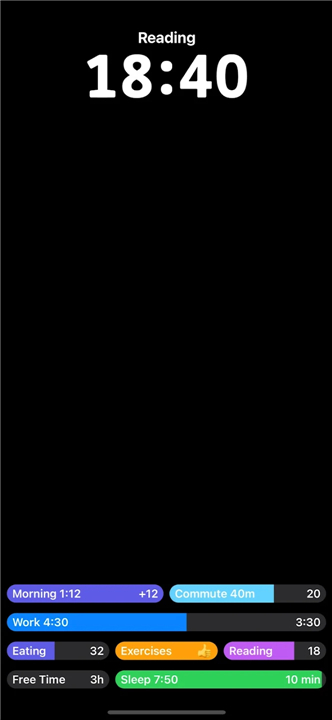
• Tapping a goal instantly starts a timer that counts down the remaining time allocated to that goal.
• The timer never stops; it runs 24 hours a day, even while you sleep, eat, or take breaks.
• There is no dedicated “stop” button; to end the current goal you must start the next one, forcing you to consciously decide what you will do next.
Checklists and Routine Support
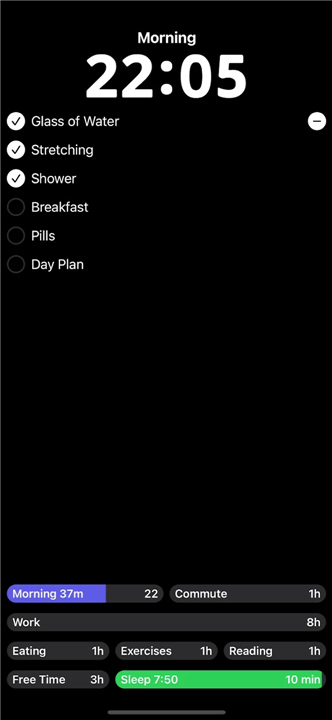
• Every goal can include a checklist of sub‑tasks (e.g., “brush teeth,” “review emails,” “stretch”).
• Checklists are ideal for structuring morning and evening routines, workout sessions, work sprints, or any repeatable process.
• Items can be marked complete with a single tap, providing instant visual feedback and a sense of progress.
Benefits
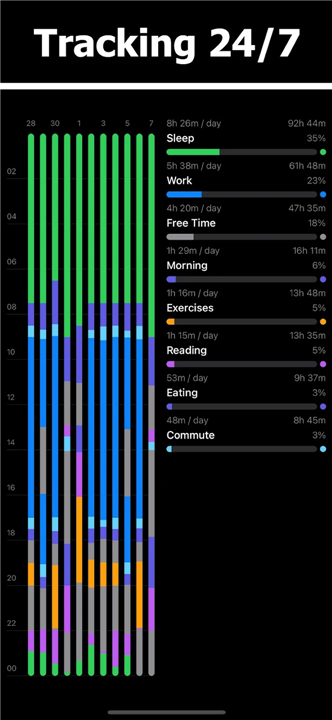
• Full‑day visibility: because the timer never pauses, you can see exactly how much time each activity consumes.
• Reduced forgetfulness: the checklist reminds you of every step required for a goal, eliminating missed tasks.
• Forced decision‑making: switching goals prompts deliberate planning rather than mindless idling.
• Simple interface: minimal screens keep the focus on what you are doing rather than on configuring settings.
Adapting timeto.me to Your Life
• Start with a few high‑priority goals (e.g., “Work Block,” “Exercise”).
• Add checklists for recurring habits you want to cement.
• Gradually expand the list as you discover new activities that need tracking.
Best regards,
Ivan
FAQ
Q: How do the continuous timer mechanics work in practice?
A: The mechanics are wonderfully simple but highly effective. When you tap on a goal to begin, the app instantly starts counting down the remaining time you allocated for that activity. The unique twist is that this timer never pauses, running twenty-four hours a day, through your work, meals, relaxation, and even while you sleep. To end your current activity, you must actively select and start the next one, creating an unbroken chain of conscious time allocation.
Q: Why isn't there a pause or stop button in the app?
A: The absence of a stop button is a deliberate design choice meant to eliminate mindless idling. In real life, time never actually pauses, so the app reflects this reality by forcing you to make a conscious decision about what you are doing next. By removing the option to simply pause and drift away, you are gently nudged to decide whether you are transitioning to rest, starting a new project, or taking a planned break.
Q: What should I do when I am sleeping, eating, or taking a break if the timer never stops?
A: Since the timer runs continuously, you simply create dedicated goals for these essential personal routines. You can set up goals like "Sleep," "Lunch Break," or "Unwind Time" with their own estimated durations. When you are ready to transition to these activities, you tap them to start their respective timers, which keeps your daily log accurate and ensures your rest is treated with the same intentionality as your work.
Version History
v2026.07.31.619——18 Aug 2026
Productivity Tools App Download the latest version of Productivity System: timeto.me to enjoy new features and updates immediately!
*2026.07.31.619
Zen Mode
Activities are Back
Emojis are Back
New Goals
Completely Redesigned Tasks
- Tasks are now managed from the home screen;
- Set an activity for the folder, so all tasks created in this folder are automatically attached to the activity.
Adding a Note for Entry
Adding a Note for Entry by "Move to Timer"
8. New Readme
I've described in detail how I use the app. Please read it.
*2026.07.23.618
Minor bug fixes and improvements. Install or update to the newest version to check it out!
*2026.07.01.615
Minor bug fixes and improvements. Install or update to the newest version to check it out!
- AppSize5.84M
- System Requirements5.0 and up
- Is there a feeFree(In game purchase items)
- AppLanguage English
- Package Nameme.timeto.app
- MD5
- PublisherIvan Medvedev
- Content RatingTeenDiverse Content Discretion Advised
- Privilege19

-
Productivity System: timeto.me 2026.07.31.619Install
5.84M2026-10-28Updated










8.8
7955 Human Evaluation
- 5 Star
- 4 Star
- 3 Star
- 2 Star
- 1 Star




