
Ohio State
The Campus Experience, Unified
• Elevate your collegiate experience and keep the heart of Ohio State right in your pocket.
• The official Ohio State app is designed to streamline your day, ensuring you spend less time navigating logistics and more time pursuing excellence.
• Whether you are tracking a bus to your next lecture or checking your meal balance between study sessions, this free tool is your essential companion for life at OSU.
• Download it today and take full control of your campus journey.
Academic and Financial Management
• Monitor your grades and stay ahead of your class schedule.
• Keep a close eye on your BuckID balances, recent transactions, and remaining meal swipes.
Campus Navigation and Life
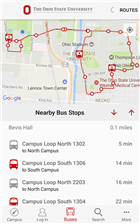
• Utilize the real-time bus locator to ensure you are never late for a commitment.
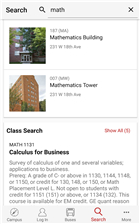
• Explore interactive maps with detailed building information and personalized amenity recommendations.
• Access the People Search directory to stay connected with the campus community.
Athletics and Engagement
• Stay informed with the latest news and schedules from Ohio State Athletics.
• Discover hidden campus gems and resources through smart, automatic recommendations.
Wear OS Integration
• Track nearby transit stops directly from your wrist.
• Sync your favorite bus routes from your phone to your watch for seamless navigation on the move.
Enhanced Mobile Access
• Once logged in, enjoy instant access to a personalized dashboard featuring your class schedule and a comprehensive BuckID summary.
• Use the integrated complication feature to keep your parking permit QR code ready for quick, hassle-free entry.
FAQ
Q: Where can I download the app to get started?
A: You can find the official Ohio State app available for download in your smartphone’s respective app store by searching for "Ohio State" or visiting the university's official mobile services webpage.
Q: How do I access my personalized information after I download the app?
A: Once you have installed the app, simply log in using your Ohio State credentials to view your personalized dashboard, which includes your specific class schedule and financial summaries.
Q: Can I check my BuckID balance through the app?
A: Yes, the app allows you to monitor your current BuckID balances, review your recent transactions, and keep track of your remaining meal swipes at any time during your day.
Version History
v2026.5.22.2——3 Jun 2026
Streamline your Ohio State experience with the official OSU app. Manage your BuckID, track buses, view grades, and navigate campus with ease. Download the latest version of Ohio State to enjoy new features and updates immediately!
*2026.5.22.2
Minor bug fixes and improvements. Install or update to the newest version to check it out!
*2026.5.13.3
Minor bug fixes and improvements. Install or update to the newest version to check it out!
*20225.5.02
Minor bug fixes and improvements. Install or update to the newest version to check it out!
- AppSize46.78M
- System Requirements5.0 and up
- Is there a feeFree(In game purchase items)
- AppLanguage English
- Package Nameedu.osu.osumobile
- MD5
- PublisherThe Ohio State University
- Content RatingTeenDiverse Content Discretion Advised
- Privilege19

-
Ohio State 2026.5.22.2Install
46.78M2026-09-13Updated










7.2
6471 Human Evaluation
- 5 Star
- 4 Star
- 3 Star
- 2 Star
- 1 Star