

MusicBee Remote
Unleash Your Music Experience
• Elevate your audio journey and take control of your MusicBee library like never before!
• MusicBee Remote empowers you to manage your PC's music directly from your Android device over Wi-Fi, transforming your listening experience with unparalleled convenience and intuitive design.
Seamless Control, Effortless Enjoyment
1. Complete Playback Mastery:
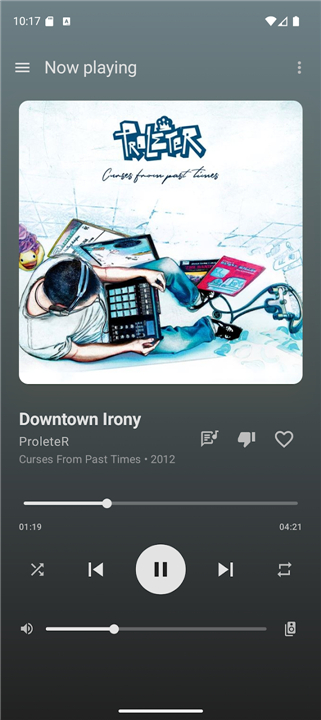
• Play, pause, skip tracks, adjust volume, and seek with precision, even through hardware buttons.
• Enjoy vivid album art, progress, and composer details on the Now Playing screen.
2. Intelligent Queue & Library Navigation:
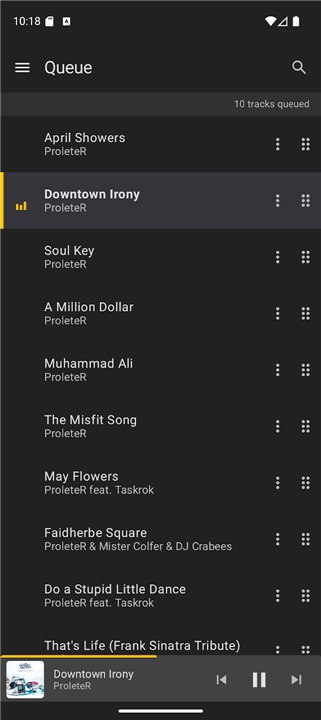
• Effortlessly reorder, remove, and search tracks in your queue.
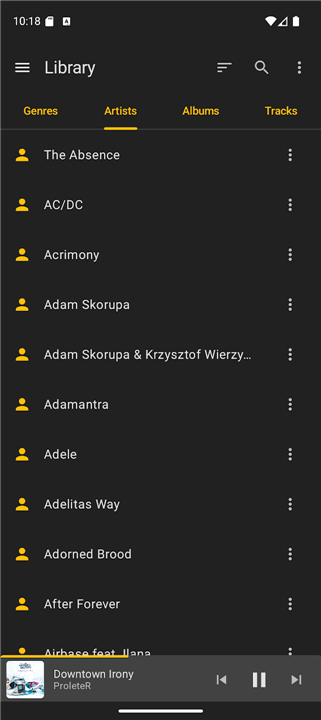
• Browse your extensive library by genres, artists, albums, or tracks, with smart sorting and album grid views.
• Instantly jump to albums or artists from your current playback.
3. Rich Personalization:
• Access detailed track metadata (genre, bitrate, file info, play stats), manage playlists with folder navigation, and enjoy radio station playback.
• Display lyrics with composer headers and fine-tune your ratings with half-star, "bomb" support, Last.fm love/ban, and scrobble toggles.
4. Smart Integrations & Enhancements:
• Benefit from resizable home screen widgets, seamless lock screen and headset media controls, and automatic pause or volume reduction during incoming calls.
• Background library metadata sync with progress notifications keeps your remote experience always up-to-date.
Empowering Your Setup
Ready to transform your music control?
• Simple Requirements: Pair your Android 6.0+ device with MusicBee v3.0+ on your computer via Wi-Fi.
• Essential Resources: Find comprehensive help, setup instructions, and the crucial companion plugin at https://mbrc.kelsos.net.
• Open Source Freedom: Both the app and its plugin are openly available under the GPLv3 License, fostering transparency and community engagement.
• App: https://github.com/musicbeeremote/mbrc
• Plugin: https://github.com/musicbeeremote/mbrc-plugin
A Collaborative Creation
• MusicBee Remote is a testament to collaborative passion.
• Please note, this is an independent, third-party application and is not officially affiliated with MusicBee or Steven Mayall.
+ Artistic Vision: The app's store listing proudly features artwork by ProleteR, licensed under CC BY-NC-ND 3.0.
+ Design Excellence: The striking logo concept originated from Jordan Georgiadis, with refinement, promotional graphics, and a significant portion of the UI and assets brought to life by Tasos Papazoglou-Chalikias.
FAQ
Q: What are the basic requirements I need to meet to use this app?
A: To get started, you will need a mobile device running at least Android 6.0 and a computer with MusicBee version 3.0 or higher installed. Since the two devices communicate over your local network, you must ensure that both your PC and your Android device are connected to the same Wi-Fi signal.
Q: Is there a specific setup process involving my computer?
A:Yes, because this is a third-party tool, you need to install a small companion plugin on your PC to act as a bridge between the desktop software and your phone. You can find the necessary plugin files along with a step-by-step setup guide at the official website located at https://mbrc.kelsos.net.
Q: Can I control my music without having to unlock my phone every time?
A: The app is designed for maximum convenience and fully supports Android’s lock screen media controls and resizable home screen widgets. You can also use the physical hardware buttons on your device or the buttons on your plugged-in headset to adjust the volume and skip tracks while the screen is off.
Version History
v1.6.1——27 Jul 2026
MusicBee Remote is a remote control application for use with MusicBee player. Download the latest version of MusicBee Remote to enjoy new features and updates immediately!
*1.6.1
This release is focused on stability and fixes several crashes reported in 1.6.0.
- Fixed out-of-memory issues that could occur while syncing the now-playing queue
- Fixed crashes caused by duplicate entries in the now-playing list
- Fixed a crash on Android 12+ when starting the background service
- Home screen widgets now rebuild correctly after an app update, clearing stale controls
- A progress bar now shows while the now-playing queue is syncing so you know what's happening
*1.6.0
MusicBee Remote 1.6.0 - our biggest update yet!
• Completely redesigned interface, rebuilt from scratch
• New light theme alongside dark mode
• Star ratings with half-stars, plus Love and Ban
• Sort genres, artists, albums and tracks
• Album grid view, great on tablets
• Resizable home screen widgets
• Play all / Shuffle all, and Go to Album/Artist
• Track details panel with extended metadata
• Faster network discovery and more reliable connections
• Many crash fixes and stability improvements
*1.5.1
- Fixes an issue where the last playing track information would not properly persist.
- Fixes an issue where pressing the up volume button once would decrease the volume.
- Fixes a crash when attempting to send debug logs via the Feedback screen.
- Fixes an issue that would cut the album title when in the album library tab.
- Fixes an issue that would fail to properly sync album covers after the first sync.
- AppSize9.15M
- System Requirements5.0 and up
- Is there a feeFree(In game purchase items)
- AppLanguage English
- Package Namecom.kelsos.mbrc
- MD5
- PublisherKonstantinos Paparas
- Content RatingTeenDiverse Content Discretion Advised
- Privilege19
-
MusicBee Remote 1.6.1Install
9.15M2026-10-27Updated










7.2
4710 Human Evaluation
- 5 Star
- 4 Star
- 3 Star
- 2 Star
- 1 Star




