

mpv-android
Overview
• mpv-android is a video player for Android devices that leverages the libmpv core to deliver a feature‑rich, high‑performance media experience.
• Built as a native Android wrapper around the libmpv library, providing the same playback engine used by the desktop mpv player.
• Designed to run on a wide range of Android hardware, from low‑end smartphones to high‑end tablets and TV boxes.
• Open‑source project with active community contributions, ensuring regular updates and bug fixes.
Core Playback Features
• Supports both hardware‑accelerated and software video decoding, automatically selecting the best method based on device capabilities.
• Handles a vast array of video and audio codecs (H.264, HEVC, VP9, AV1, AAC, Opus, FLAC, etc.) through ffmpeg integration.
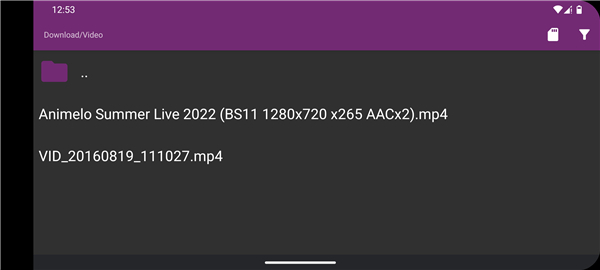
• Provides seamless playback of local files, network streams, and DVD/Blu‑ray images via libmpv’s input system.
• Includes background audio playback, allowing users to continue listening while the app is not in the foreground.
User Interaction & Controls
• Gesture‑based interface: swipe left/right for seeking, up/down on the left side for volume, and on the right side for brightness.
• Supports double‑tap to pause/resume and pinch‑to‑zoom for video aspect ratio adjustments.
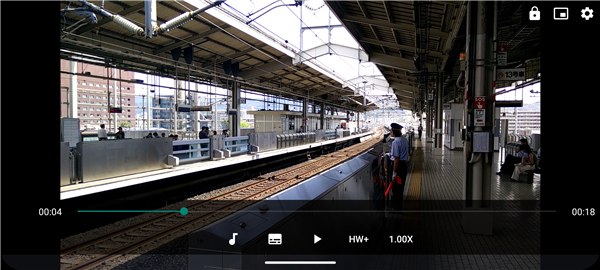
• Optional on‑screen controls can be enabled for users who prefer traditional buttons.
• Keyboard input is recognized when a physical or Bluetooth keyboard is connected, offering shortcuts for playback control.
Subtitle & Text Rendering
• Full libass support for styled subtitles, including fonts, colors, positioning, and animation effects.
• Secondary (dual‑subtitle) mode enables displaying two subtitle tracks simultaneously, useful for language learning or translation.
• Automatic subtitle downloading from online services can be configured via external scripts.
Advanced Video Processing
• Configurable video filters such as interpolation (motion smoothing), debanding, denoising, and color correction.
• A variety of scalers (bilinear, bicubic, Lanczos, spline, etc.) allow users to tailor image quality to their hardware.
• HDR tone‑mapping and color‑space conversion are available for compatible displays.
• Frame‑dropping and timing adjustments help maintain smooth playback on weaker devices.
Network & Streaming Capabilities
• “Open URL” function enables playback of HTTP, HTTPS, FTP, SFTP, and various streaming protocols (HLS, DASH, RTSP).
• Supports streaming from popular platforms via plugins or custom scripts.
• Caching and buffering options can be tuned to reduce stutter on unstable connections.
Additional Usability Features
• Picture‑in‑Picture (PiP) mode lets users continue watching video while using other apps.
• Playlist support with drag‑and‑drop reordering, repeat, and shuffle modes.
• Sleep timer and power‑saving options to reduce battery consumption during long sessions.
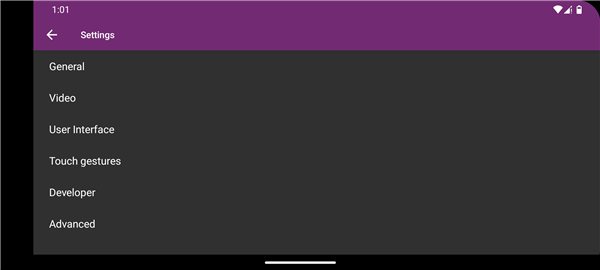
• Extensive settings menu accessible via gestures or the standard Android settings interface, allowing fine‑tuning of decoding, audio output, and UI behavior.
• Overall, mpv-android combines the robustness of libmpv with Android‑specific conveniences, offering a versatile solution for casual viewers and power users alike.
FAQ
Q: What gesture controls are available by default?
A: Swiping left or right seeks backward or forward, swiping up or down on the left side adjusts volume, and the same vertical swipe on the right side changes screen brightness; a double‑tap toggles play/pause, while pinch‑to‑zoom lets you tweak the video aspect ratio.
Q: Can I use traditional on‑screen buttons instead of gestures?
A: Yes, the settings menu includes an option to enable classic on‑screen controls, giving you play, pause, stop, seek, and volume buttons if you prefer a more conventional interface.
Q: How does mpv-android handle subtitles?
A: It fully supports libass for styled subtitles, allowing fonts, colors, positioning, and animations; you can also activate dual‑subtitle mode to show two tracks at once, and configure automatic subtitle downloads via external scripts.
Version History
v2026-09-17 Build——17 Sep 2026
Video player for Android based on libmpv Download the latest version of mpv-android to enjoy new features and updates immediately!
*2026-09-17 Build
- Fixes:
- Fixed freeze/long delay before first TLS connection
- hwdec-related bug fixes
*2026-08-11 Build
Minor bug fixes and improvements. Install or update to the newest version to check it out!
*2026-04-25 Build
Minor bug fixes and improvements. Install or update to the newest version to check it out!
- AppSize129.00M
- System Requirements5.0 and up
- Is there a feeFree(In game purchase items)
- AppLanguage English
- Package Name2026-09-17 Build
- MD5
- PublisherPrismriver Media
- Content RatingTeenDiverse Content Discretion Advised
- Privilege19
-
mpv-androidInstall
129.00M2026-11-02Updated










8.5
7253 Human Evaluation
- 5 Star
- 4 Star
- 3 Star
- 2 Star
- 1 Star




