
Mirroring (AirPlay & Sunshine)
Overview
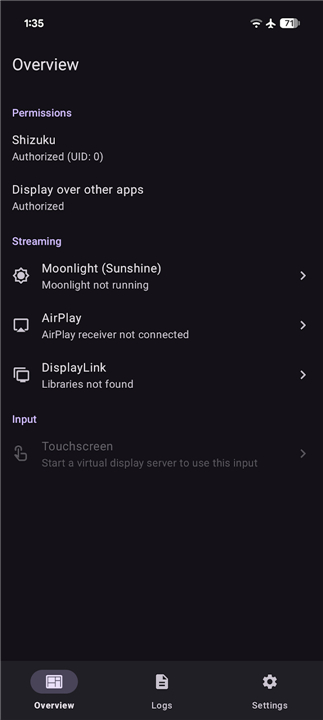
• Elevate your digital experience by transforming how you connect, share, and interact with your technology.
• This advanced suite of tools empowers you to transcend traditional boundaries, turning every screen into a canvas for productivity and inspiration.
Limitless Wireless Freedom
• Expand your reach with comprehensive AirPlay support that bridges the gap between generations.
• By integrating both AirPlay 1 and AirPlay 2 protocols, you gain the power to cast effortlessly to Apple TVs, Mac computers, and a wide array of certified third-party receivers.
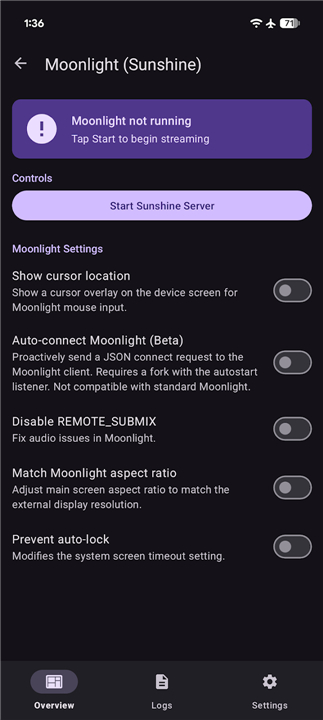
• Unleash the full potential of high-performance streaming through an internal Sunshine server.
• This integration provides a lightning-fast, low-latency connection to any Moonlight client, ensuring your remote video casting and control feel as responsive as a local connection.
Solid and Versatile Wired Connectivity
• Experience the unwavering reliability of professional-grade hardware integration.
• By leveraging DisplayLink technology through standard USB ports, you can establish stable, high-definition video links to external monitors and docking stations with absolute confidence.
• Maximize your workstation efficiency by converting simple USB-to-HDMI adapters into powerful gateways for your visual content, ensuring your host device is always ready for a larger stage.
Next-Generation Display Virtualization
• Redefine your multitasking capabilities by transforming every connected screen into an independent virtual workspace.
• Within the Android architecture, these displays are recognized as unique entities, allowing you to run separate applications and tasks simultaneously on different monitors.
• Customize your digital environment by directing specific activities to secondary screens, creating a tailored ecosystem that adapts to your unique workflow and creative needs.
Unified Interaction and Command
• Achieve total mastery over your mirrored environment with a sophisticated input relay system.
• This technology ensures that every touch gesture, mouse movement, and keystroke on the receiving device is instantly reflected on the host.
• Bridge the distance between your devices by maintaining full interactive control, allowing you to manage complex interfaces remotely with the same precision and ease as if you were sitting right in front of them.
FAQ
Q: What makes the internal Sunshine server better than standard screen mirroring methods?
A: The internal Sunshine server is specifically engineered for high-performance streaming where speed is the top priority. By providing a lightning-fast, low-latency connection, it ensures that your remote video casting feels incredibly fluid, making the experience of using a remote device feel as responsive as if it were connected directly to your local machine.
Q: What is the relationship between the Sunshine server and Moonlight clients?
A: Sunshine acts as the powerful host server that processes and sends the video data, while Moonlight functions as the client that receives and displays that stream. Because this integration is optimized for efficiency, you can use any Moonlight-compatible device to access your host’s screen with professional-grade stability and minimal lag.
Q: Can I use a wired connection if my wireless network is unstable?
A: The system is built with professional-grade versatility in mind, offering solid wired connectivity through DisplayLink technology. By using standard USB ports, you can establish a high-definition video link to external monitors and docking stations, providing a reliable alternative to wireless casting when you need absolute confidence in your connection.
Version History
v0.0.33——10 Aug 2026
Screen mirroring manager with support for AirPlay, Moonlight, and DisplayLink Download the latest version of Mirroring (AirPlay & Sunshine) to enjoy new features and updates immediately!
*0.0.33
Minor bug fixes and improvements. Install or update to the newest version to check it out!
*0.0.32
Minor bug fixes and improvements. Install or update to the newest version to check it out!
*0.0.31
Minor bug fixes and improvements. Install or update to the newest version to check it out!
- AppSize52.30M
- System Requirements5.0 and up
- Is there a feeFree(In game purchase items)
- AppLanguage English
- Package Nameio.github.jqssun.displaymirror
- MD5
- Publisherjqssun
- Content RatingTeenDiverse Content Discretion Advised
- Privilege19
-
Mirroring (AirPlay & Sunshine) 0.0.33Install
52.30M2026-10-28Updated
-
投屏助手 1.1.14590Install
5.46M2026-10-28Updated










7.2
2940 Human Evaluation
- 5 Star
- 4 Star
- 3 Star
- 2 Star
- 1 Star