
Material Photo Widget
Empower Your Home Screen
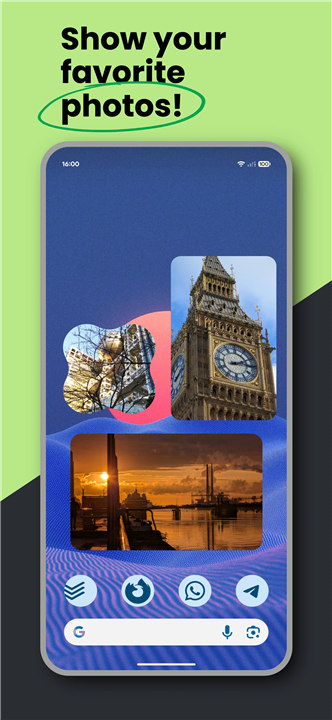
• Material Photo Widget transforms your mobile experience into a personalized gallery.
• Designed for those who value privacy and aesthetics, this free, open-source tool allows you to curate your digital space without the interruption of advertisements.
• Turn your home screen into an inspirational canvas that reflects who you are and what you love.
Dynamic Functionality
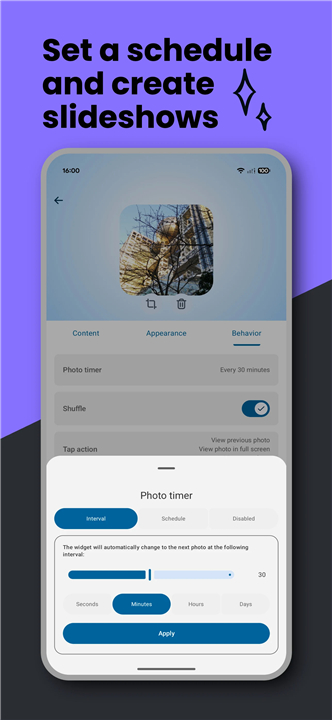
• Showcase your favorite memories through automated slideshows or individual photo displays.
• Sync directly with device folders for a rotating gallery that stays fresh.
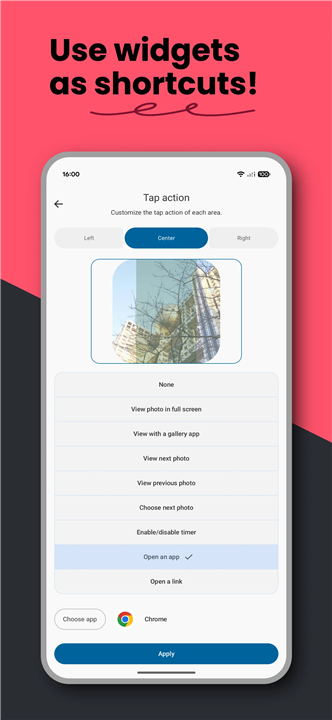
• Create interactive shortcuts that launch specific apps, websites, or full-screen views with a single tap.
• Keep essential information like schedules or membership passes visible and accessible.
Creative Freedom
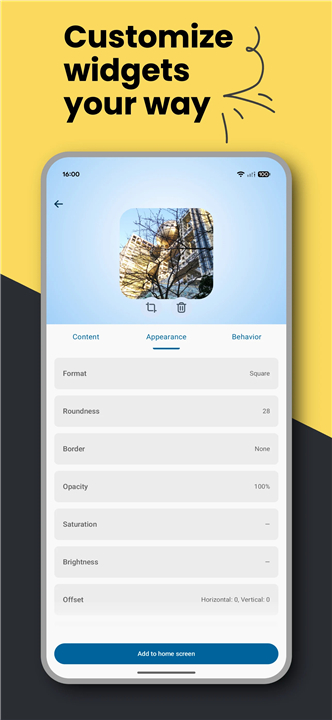
• Choose from six distinct layouts including Square, Tall, Wide, and Original.
• Experiment with 28 different shapes to break away from traditional grids.
• Fine-tune the aesthetic with adjustable borders, opacity, saturation, and brightness.
• Customize padding and offsets to ensure a perfect fit with your existing icons.
Simple Integration
• Launch the app and select Create a New Widget to begin your design.
• Alternatively, long-press your home screen and find Material Photo Widget in your system menu.
• Configure your preferences and tap Add to Home Screen to finalize your creation.
Reliability and Performance
• The app is engineered for efficiency, running in the background only when necessary to preserve battery life.
• To prevent Android from pausing your widget, ensure battery and memory restrictions are disabled for the app.
• For consistent performance after a device restart, enable the auto-start permission in your system settings.
Privacy and Security
• Built on a foundation of trust, this is a fully open-source project with no tracking or network communication.
• The app respects your privacy by using native system pickers, requiring no broad storage permissions.
• Your data remains on your device, ensuring your photos and shortcuts stay secure.
• Review the source code or provide feedback at: https://github.com/fibelatti/photo-widget
FAQ
Q: How can this widget help me personalize my home screen?
A: This widget significantly enhances your home screen by allowing you to display individual photos or create automated slideshows of your favorite memories. You can also integrate interactive shortcuts directly into your images to launch apps, websites, or even full-screen views, truly making your device a reflection of your personality and interests.
Q: Does the Material Photo Widget support dynamic photo displays or just static images?
A: It absolutely supports dynamic displays! You have the flexibility to showcase individual static photos or set up automated slideshows that rotate through a selection of your cherished memories, ensuring your home screen always feels fresh and engaging.
Q: Can I sync the widget with specific photo folders on my device?
A: Yes, you certainly can! The Material Photo Widget offers the convenient feature of syncing directly with folders on your device. This means you can have a rotating gallery that automatically updates with new photos as they are added to your chosen folders.
Version History
v1.42.3——11 May 2026
A home screen widget to display your favorite photos Download the latest version of Material Photo Widget to enjoy new features and updates immediately!
*1.42.3
This version brings the following updates:
• Fixes widgets sometimes getting stuck on a photo when using the interval option
• Displays the photo path in the full screen viewer (folder widgets only)
Thanks for using the app!
*1.42.2
This version brings the following updates:
• Fixes a crash that could happen when selecting GIF as the source
• Fixes images not refreshing after cropping
• Fixes the crop queue not being emptied after exiting the crop tool
Thanks for using the app!
*1.42.1
This version brings the following updates:
• Advanced schedule: set a time for each widget photo
• Ability to customize the background color of the full screen viewer
• Fix tap action picker not keeping required actions in sync
Thanks for using the app!
- AppSize4.18M
- System Requirements5.0 and up
- Is there a feeFree(In game purchase items)
- AppLanguage English
- Package Namecom.fibelatti.photowidget
- MD5978af06dd859287fdf519b8212b63071
- PublisherFilipe Belatti
- Content RatingTeenDiverse Content Discretion Advised
- Privilege19

-
Material Photo Widget 1.42.3Install
4.18M2026-09-26Updated










8.9
7885 Human Evaluation
- 5 Star
- 4 Star
- 3 Star
- 2 Star
- 1 Star