

Json List
What is it?
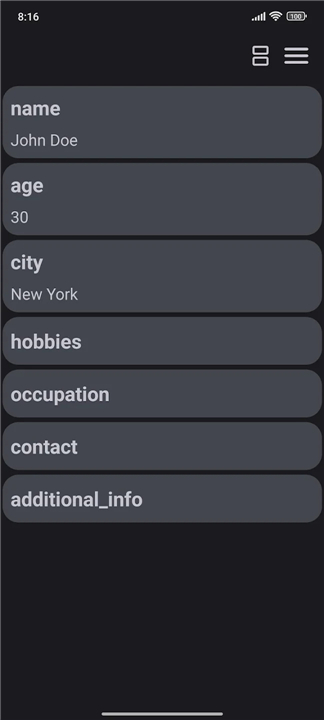
• Json List is a lightweight, cross‑platform utility designed to simplify the inspection, navigation, and modification of JSON data.
• It transforms raw JSON structures into a clean, hierarchical list view that can be interacted with intuitively, whether the source file resides locally on a device or is fetched from a remote URL.
Overview
• Provides an instant, readable representation of JSON objects and arrays.
• Eliminates the need to scroll through dense, unformatted text.
• Supports both local file system access and remote HTTP/S endpoints.
Core Features
• Material You dynamic color theming: the interface adapts its palette to match the system’s accent colors, ensuring visual harmony with the host operating system.
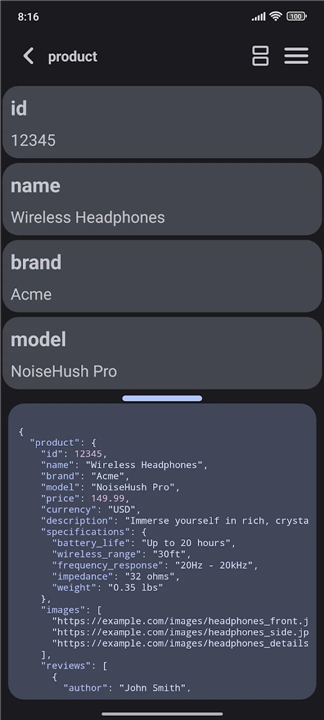
• Split‑screen mode: displays the original raw JSON on one pane while the synchronized list view appears on the opposite pane, allowing real‑time comparison.
• Inline search and filter: type keywords to locate specific keys, values, or array items; filtered results update instantly as the list narrows.
• Direct item editing: select any node to modify its value, add new properties, or delete existing entries without leaving the application.
• Undo/redo history: keeps track of changes so users can revert or reapply edits safely.
Interaction & Navigation
• Expandable/collapsible nodes let users drill down into nested structures or collapse branches to focus on higher‑level data.
• Keyboard shortcuts accelerate common actions such as opening files, initiating search, and toggling split‑screen view.
• Drag‑and‑drop support for loading local JSON files directly into the workspace.
Performance & Compatibility
• Optimized for low memory usage; handles files up to several megabytes with minimal latency.
• Works on desktop (Windows, macOS, Linux) and mobile platforms (Android, iOS) via native or web‑based builds.
• No external dependencies required; runs as a standalone executable or progressive web app.
Practical Use Cases
• Developers validating API responses during integration testing.
• Data analysts exploring configuration files or log exports.
• Educators demonstrating JSON structure concepts in classroom settings.
• Content managers adjusting localization payloads or configuration settings.
By combining a straightforward list presentation with powerful editing and search tools, Json List streamlines everyday JSON workflows while remaining accessible to users of varying technical expertise.
FAQ
Q: How does the split‑screen mode help me?
A: In split‑screen you see the original raw JSON on one side and the formatted list view on the other. The two panes stay synchronized, so any change you make in the list instantly updates the raw text, and vice‑versa. It’s a handy way to verify that your edits are exactly what you expect.
Q: What does “Material You dynamic color theming” mean?
A: Json List automatically adopts the accent colors you’ve chosen for your operating system. The interface subtly changes its palette to match, giving you a visually cohesive experience without any extra configuration.
Q: I’m not a developer—can I still use the search feature?
A: Definitely. Just click into the search box and type any word, key name, or value you’re looking for. Json List filters the list in real time, showing only the matching nodes, so you can locate information without digging through the whole structure.
Version History
v1.10——24 Aug 2026
previewing JSON from file or url in a user-friendly list format Download the latest version of Json List to enjoy new features and updates immediately!
*1.10
Bugfix
- Fixed app not showing in "Open with..." dialog on some file explorers
New
- Automatically check for update and notify in the app if it has new version
Updates
- UI update for list item for object or array
- Update display name of array
*1.9
Bugfix
- Fixed an issue where overwriting a file could result in invalid JSON
- Fixed bug when large data tries to display in raw JSON View
Optimization
- Working with large data is more faster
New
- Added toggle for scroll animation in settings
Updates
- Update feedback dialog
- Handle numbers with leading zeros as strings
- Improve search UX and UI feedback
*1.8
Bugfix
- correct handling for escape sequences (n, t, r...)
New
- Resizable Split View
- Search
- Release Notes
Updates
- UI Update
- Tool menu
- Progress bar
- Save Button position
- Update edit mode
- Now you can change all key names that has same name in a list at once
- Update animations
- AppSize5.81M
- System Requirements5.0 and up
- Is there a feeFree(In game purchase items)
- AppLanguage English
- Package Namecom.sjapps.jsonlist
- MD5
- PublisherSJ14Apps
- Content RatingTeenDiverse Content Discretion Advised
- Privilege19

-
Json List 1.10Install
5.81M2026-10-28Updated










9.4
5693 Human Evaluation
- 5 Star
- 4 Star
- 3 Star
- 2 Star
- 1 Star




