
iAdb
Overview
1. What is iAdb?
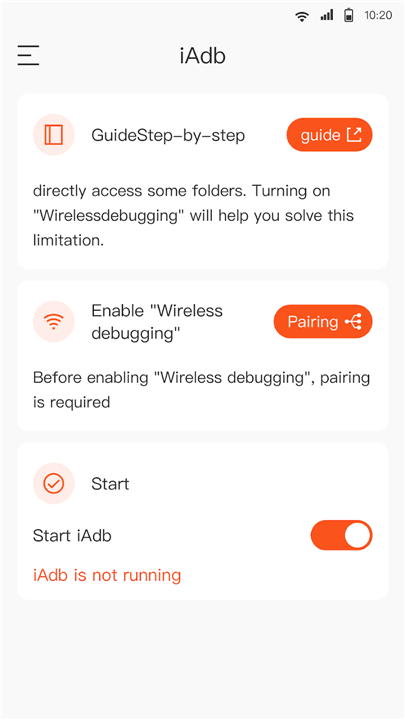
• iAdb is an advanced implementation of the Android Debug Bridge (ADB) that focuses on simplifying the debugging process for developers and power users.
2. Primary Goal:
• It enables wireless debugging on devices running Android 11 (API level 30) or later, allowing direct access to specific application directories without the need to connect the device to a computer via USB.
Key Features
1. Wireless Debugging Support
• Leverages the native wireless ADB capabilities introduced in Android 11, eliminating cables and streamlining workflows.
2. Selective Folder Access
• Grants apps permission to read or write to designated internal folders (e.g., /data/data/<package>/files) while respecting Android’s security model.
3. Lightweight API
• Provides a concise set of commands that can be invoked from scripts, CI pipelines, or custom development tools.
4. Cross‑Platform Compatibility
• Works on Windows, macOS, and Linux, offering a consistent experience across development environments.
5. Open‑Source Transparency
• The source code and documentation are publicly available, encouraging community contributions and audits.
Getting Started
1. Prerequisites
• Android device running version 11 or higher.
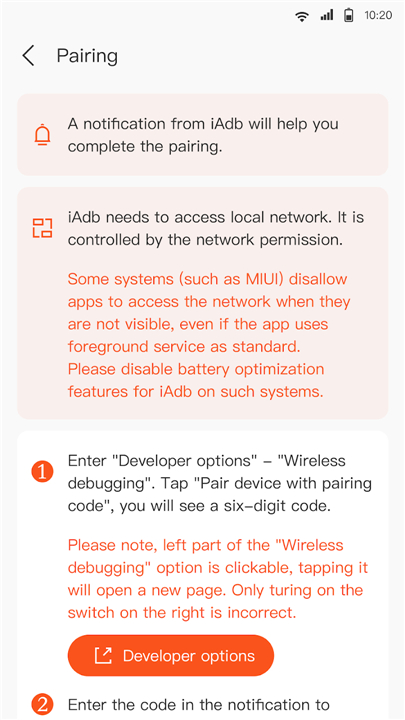
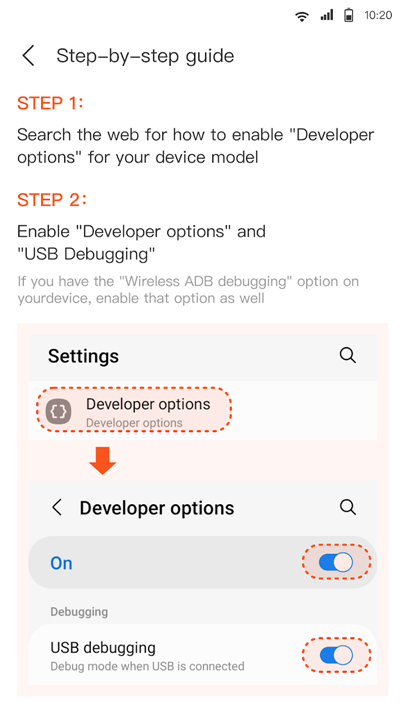
• Developer options enabled and “Wireless debugging” turned on.
• A network connection that allows the device and host machine to communicate (same Wi‑Fi LAN is typical).
2. Installation Steps
• Clone the repository or download the latest release from the official GitHub page.
• Add the executable to your system’s PATH or invoke it directly from the project folder.
• Pair your device using the QR code or pairing code displayed in the device’s wireless debugging dialog.
3. Basic Commands
• iadb devices – Lists all devices currently reachable over the network.
• iadb shell <command> – Executes a shell command on the remote device.
• iadb pull <remote_path> <local_path> – Retrieves files from the device to the host.
• iadb push <local_path> <remote_path> – Sends files from the host to the device.
Further Information & Resources
1. Official Repository:
• Explore the full documentation, sample code, and issue tracker at:
https://github.com/FileContainer/iAdb-api
2. Community Contributions:
• Fork the project, submit pull requests, or open discussions to suggest new features or report bugs.
Support & Feedback
1. Contact Email:
• For any questions, bug reports, or feature requests, please reach out to the development team at fileplus.business@gmail.com.
2. Response Time:
• The team aims to acknowledge incoming messages within 48 hours and provide a detailed reply as promptly as possible.
Your Mobile Gateway to Market Research
• By leveraging iAdb, developers can streamline their debugging workflows, reduce reliance on physical cables, and gain controlled access to critical application data—all while enjoying an open‑source tool that evolves with the Android ecosystem.
FAQ
Q: Why would I choose iAdb over the traditional ADB?
A: The classic ADB requires a physical connection for most operations, which can be cumbersome in a lab, CI pipeline, or when you simply want to move files quickly. iAdb builds on Android’s native wireless debugging introduced in Android 11, removes the cable, and supplies a trimmed‑down command set focused on the tasks developers need most.
Q: Which Android versions does iAdb support?
A: iAdb works with devices running Android 11 and any later release. The underlying wireless‑debugging protocol is part of the platform from API 30 onward, so as long as the device can enable “Wireless debugging” in the developer options, iAdb will be able to connect.
Q: Do I need to root my device to use iAdb?
A: No. iAdb respects the Android security model. It can read from or write to a chosen internal directory (for example /data/data/<package>/files) only after the user grants the appropriate permission through the standard debugging handshake. No rooting is required.
Version History
v1.4.2——18 May 2026
iAdb is a debugging utility app that enables wireless ADB for folder access on Android 11+. Download the latest version of iAdb to enjoy new features and updates immediately!
*1.4.2
Excellent wireless adb debugging tool
*1.4.0
Excellent wireless adb debugging tool
*1.3.0
Excellent wireless adb debugging tool
- AppSize5.20M
- System Requirements5.0 and up
- Is there a feeFree(In game purchase items)
- AppLanguage English
- Package Namecom.iadb.helper
- MD5ed92ec8aa7d6ba19c5302fe3841209b3
- PublisherFile Container
- Content RatingTeenDiverse Content Discretion Advised
- Privilege19
-
iAdb 1.4.2Install
5.20M2026-09-18Updated










7.3
8507 Human Evaluation
- 5 Star
- 4 Star
- 3 Star
- 2 Star
- 1 Star