

GitSync
Streamline Your Workflow with GitSync
• Take total control of your code wherever you go.
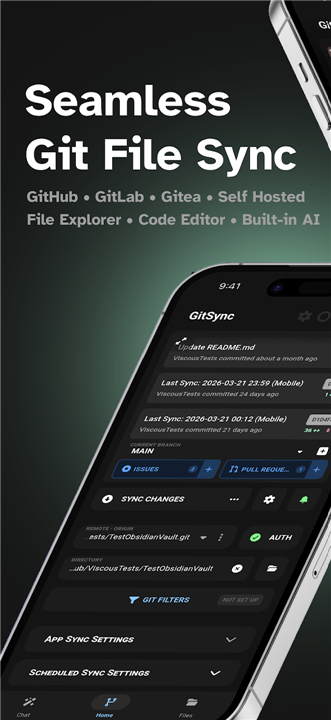
• GitSync is the ultimate Android Git client designed to keep your local directories and remote repositories effortlessly synchronized in the background.
• Setup takes seconds, giving you the freedom to focus on building, editing, and managing your projects anywhere.
Seamless Synchronization & Core Git Engine
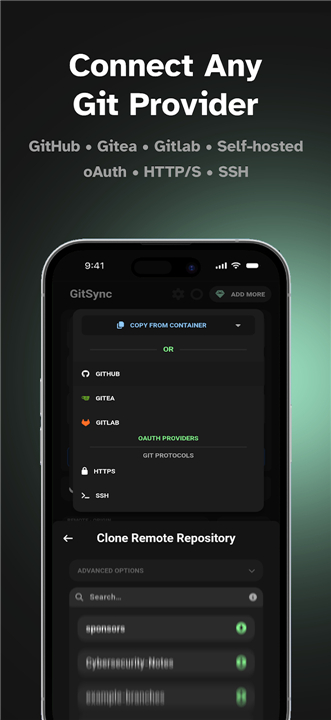
• Compatible with Android 5+ using HTTP/S, SSH, and OAuth for GitHub, GitLab, and Gitea.
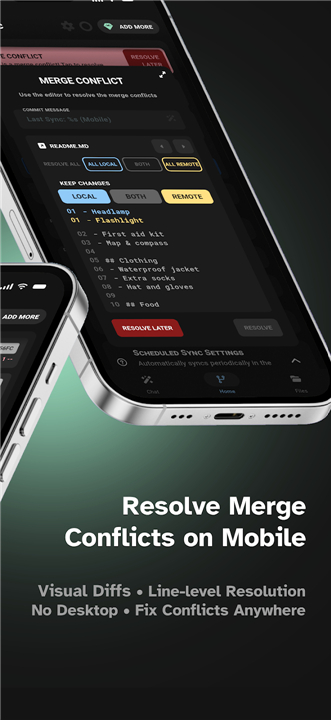
• Effortlessly clone, fetch, pull, stage, commit, push, and resolve merge conflicts.
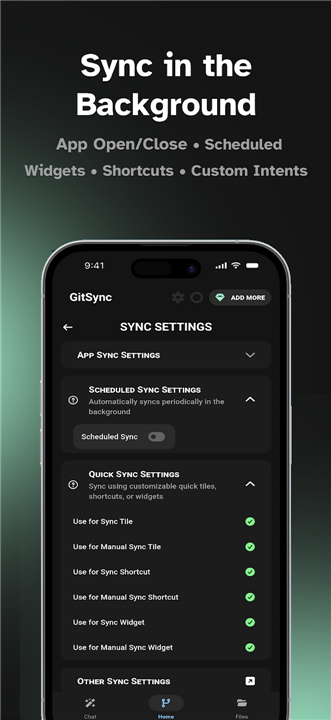
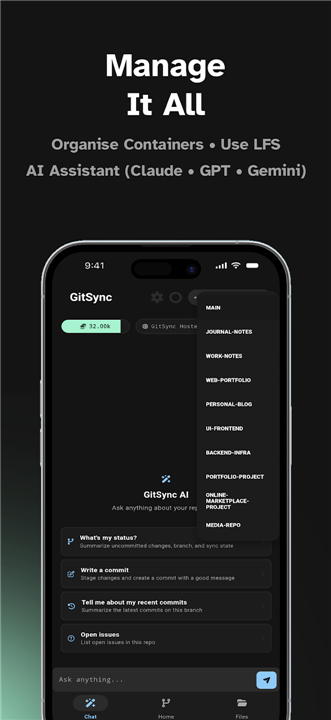
• Automate syncs on custom schedules, upon opening or closing apps, from Quick Settings tiles, home screen widgets, or custom intents.
• Stay protected with automatic network retry triggers that resume syncs as soon as your connection drops and restores.
In-App Editing & Repository Management
• Browse and edit files with a built-in code editor, image viewer, and detailed commit and line diffs.
• Manage branches, multiple remotes, signed commits, and custom author configurations.
• Modify project settings easily, including .gitignore, git-crypt, Git LFS, and per-repo SSL verification.
• Interact directly with GitHub and GitLab issues, pull requests, and GitHub Actions workflows.
Smart AI Assistance
• Engage in intelligent chat with your repository to quickly understand code contexts.
• Speed up your writing using AI auto-complete for commit messages and text fields.
• Delegate repository actions to an intelligent AI agent, or disable all AI features globally with a single click.
Flexible Upgrades & Enterprise Scaling
• Expand your capabilities with Premium to unlock multi-repository containers, Git LFS, and git-crypt—available via in-app purchase or GitHub Sponsorship.
• Power your AI features using convenient hosted credits or by bringing your own API key.
• Provision team access seamlessly using Enterprise codes with instant admin control and email verification.
Privacy & Accessibility Commitment
• GitSync utilizes Android’s Accessibility Service solely to detect when apps open or close for automated syncing.
• Your data remains strictly yours: zero personal information is ever stored, tracked, or shared.
• You retain full control to toggle permissions at any time in your device settings.
FAQ
Q: What Android devices can run GitSync?
A: GitSync is compatible with any mobile device running Android 5 or higher. It seamlessly supports standard protocols including HTTP/S, SSH, and OAuth connections.
Q: Which code hosting platforms does GitSync support?
A: You can connect GitSync directly to your favorite platforms, including GitHub, GitLab, and Gitea. Setting up authentication is quick and secure using modern OAuth options, SSH keys, or standard HTTP settings.
Q: Can I perform standard Git operations inside the app?
A: Yes, you can easily perform all essential Git commands directly from your device. GitSync allows you to clone, fetch, pull, stage, commit, and push your code, as well as view and resolve merge conflicts whenever they arise.
Version History
v1.8.63——24 Aug 2026
Git client for syncing a repository between remote and a local directory Download the latest version of GitSync to enjoy new features and updates immediately!
*1.8.63
Minor bug fixes and improvements. Install or update to the newest version to check it out!
*1.8.62
Minor bug fixes and improvements. Install or update to the newest version to check it out!
*1.8.61
Minor bug fixes and improvements. Install or update to the newest version to check it out!
- AppSize22.10M
- System Requirements5.0 and up
- Is there a feeFree(In game purchase items)
- AppLanguage English
- Package Namecom.viscouspot.gitsync
- MD5
- PublisherViscousPotential
- Content RatingTeenDiverse Content Discretion Advised
- Privilege19
-
GitSync 1.8.63Install
22.10M2026-10-28Updated










7.0
156 Human Evaluation
- 5 Star
- 4 Star
- 3 Star
- 2 Star
- 1 Star




