

Copy SMS Code - OTP Helper
Overview
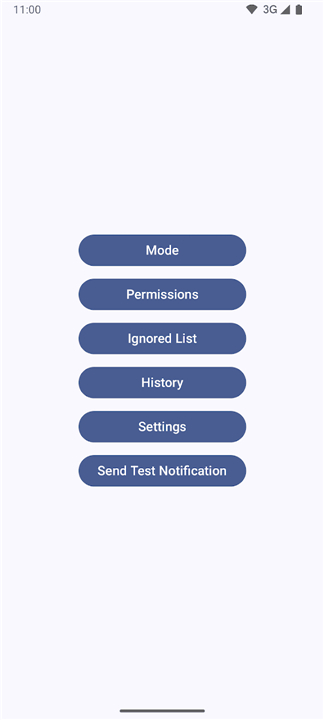
• Copy SMS Code – OTP Helper is an open‑source Android application designed to automatically extract one‑time passwords (OTP), verification codes, and other short numeric or alphanumeric strings that arrive via SMS or system notifications.
• The app runs locally on your device, requiring no network access, and can be installed directly from the provided release files or built from source.
Key Features
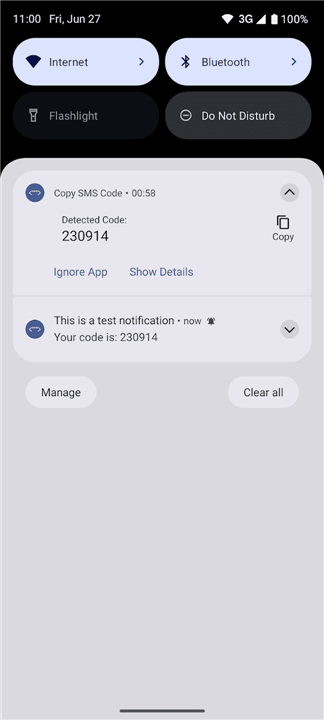
• Automatic detection of OTP and verification codes from all incoming notifications, including SMS, messenger apps, and email preview notifications.
• Instant copy‑to‑clipboard functionality: the extracted code is placed on the clipboard as soon as it is detected, ready for immediate pasting.
• Customizable pattern matching: users can define regex patterns to capture codes of specific length or format.
• Lightweight and battery‑friendly: runs as a background service with minimal resource consumption.
• Fully offline operation: all processing happens on‑device, guaranteeing that no personal data is transmitted elsewhere.
Privacy & Security
• No internet permission is requested; the app never contacts external servers.
• All data stays on the device: notification contents are read only for the purpose of extracting the relevant code and are never stored long‑term.
• Open‑source transparency: the complete source code is publicly available, allowing anyone to audit the handling of sensitive information.
How It Works
• The app registers a notification listener service that monitors every incoming notification.
• Upon receipt, the service scans the notification text for patterns that match common OTP formats.
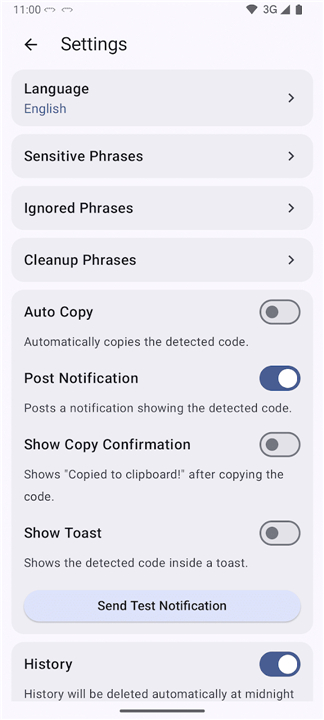
• When a match is found, the code is copied to the system clipboard and an optional toast message confirms the action.
Support & Contributions
• Encountered a bug, have a feature idea, or need assistance?
• Open an issue on the GitHub repository:
https://github.com/jd1378/otphelper/issues
• Contributions are welcomed: fork the project, make improvements, and submit a pull request.
Getting Started
• Install the app, grant notification‑access permission, and the service begins working automatically.
• Adjust pattern settings in the app’s preferences page if your OTP format differs from the defaults.
FAQ
Q: How does the app actually detect and extract the codes from my notifications?
A: Under the hood, the app registers a specialized Android service called a Notification Listener. Whenever a new notification arrives on your device, this service swiftly scans the incoming text for common patterns that look like temporary verification codes or PINs. Once it identifies a sequence of numbers or specific alphanumeric characters that matches its search criteria, it instantly extracts just that code and places it on your system clipboard for you to use.
Q: Is it safe to let this app read my notifications, and where is my data stored?
A: Yes, it is highly secure. While the app does read incoming notification text to look for verification codes, it processes this information instantly and never stores your personal data or notification history long-term. Because the app has absolutely no network privileges, it is physically impossible for it to transmit your private information or codes to external servers, keeping everything safely locked on your own device.
Q: Which types of notifications can the app extract codes from?
A: The app is quite versatile and is not just limited to traditional SMS messages. It can monitor and extract verification codes from almost any incoming notification that displays text, including popular messenger apps like WhatsApp or Telegram, and even preview notifications from your email clients. As long as the code is visible in the notification banner that pops up on your screen, the helper can grab it.
Version History
v1.20.5——20 Aug 2026
an open-source app that can detect and copy any code for you Download the latest version of Copy SMS Code - OTP Helper to enjoy new features and updates immediately!
*1.20.5
- Fixed a bug where the same code could be detected more than once in notification mode (some apps repost a notification with a new id within seconds)
- Increased the duration of the code detection toast so it is easier to read
- Fixed a crash when tapping a link in the app while no app is available to open it
*1.20.4
- Increased code detection notification timeout to 3 minutes
- Fixed a bug where ignored phrases did not work in SMS mode
- Removed unused permission about accessing network state (It was added automatically by a library and not used anywhere. We decided to remove it for your peace of mind.)
- Added a small reminder to check permissions on mode change
*1.20.3
Minor bug fixes and improvements. Install or update to the newest version to check it out!
- AppSize3.17M
- System Requirements5.0 and up
- Is there a feeFree(In game purchase items)
- AppLanguage English
- Package Nameio.github.jd1378.otphelper
- MD5
- PublisherDekame
- Content RatingTeenDiverse Content Discretion Advised
- Privilege19
-
Copy SMS Code - OTP Helper 1.20.5Install
3.17M2026-10-28Updated










8.1
7595 Human Evaluation
- 5 Star
- 4 Star
- 3 Star
- 2 Star
- 1 Star




